Ensuring your certificates are valid and approved within Certifi is essential to ensure your compliance to work. To manage your certificates within Certifi, follow these steps:
- Navigate to your My Certificates page by clicking Certificates in the header from any Certifi page.

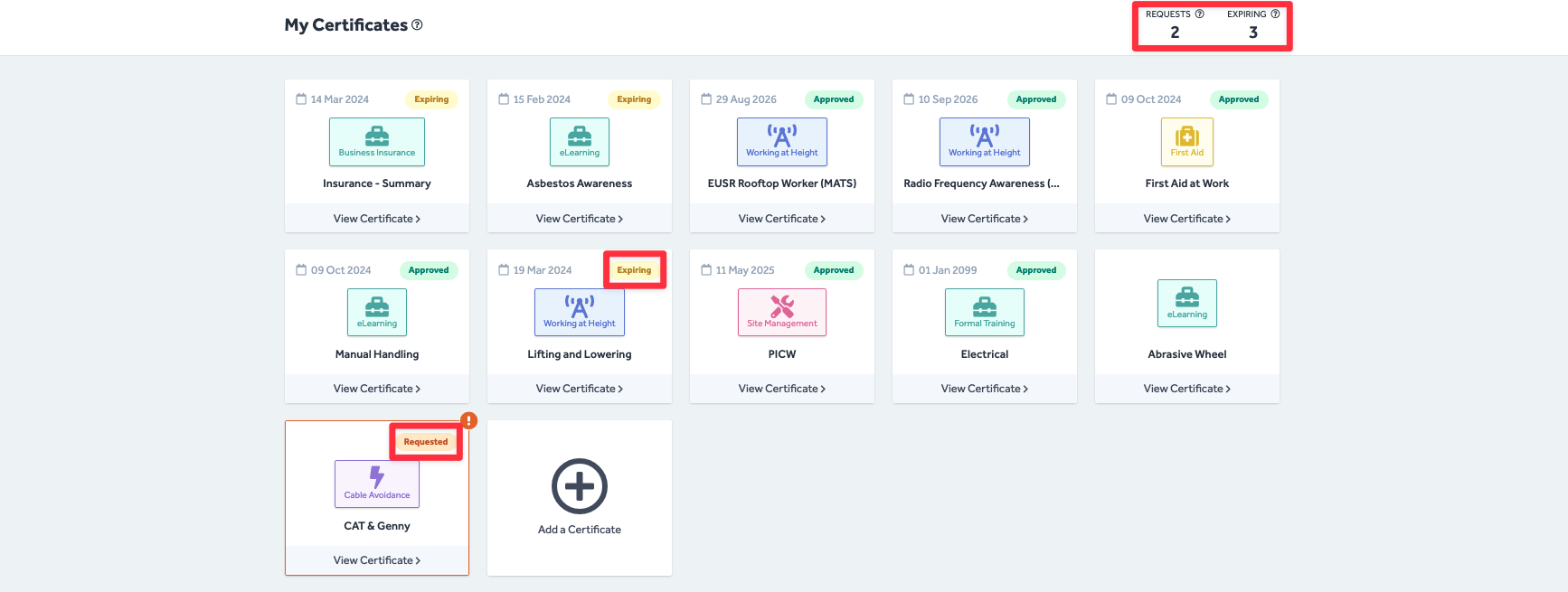
- On the My Certificates page, your certificates are presented in a tile format for easy digestibility.
- In the top right-hand corner is an overview of the number of Requested and Expiring certificates that require your attention.
- These flags are also reflected in the tags on each certificate tile.
For more information about monitoring certificate expiry, archiving certificates, responding to Certifi certificate requests, renewing your expiring certificates and adding new certificates to Certifi, please read the following articles:
- How To: Monitor Certificate Expiry
- How To: Archive a Certificate
- How To: Respond to a Certificate Request
- How To: Renew Your Certificates
- How To: Upload a Certificate
To protect the data privacy of our platform users, all data visible in images throughout this article is from a dummy dataset generated expressly for demonstration purposes. It is not real data.