Certifi uses a four-step timesheet processing method to ensure the accuracy of timesheets before payment. This article provides an in-depth explanation of this system.
The below figure shows a flowchart through the six possible states of a timesheet:
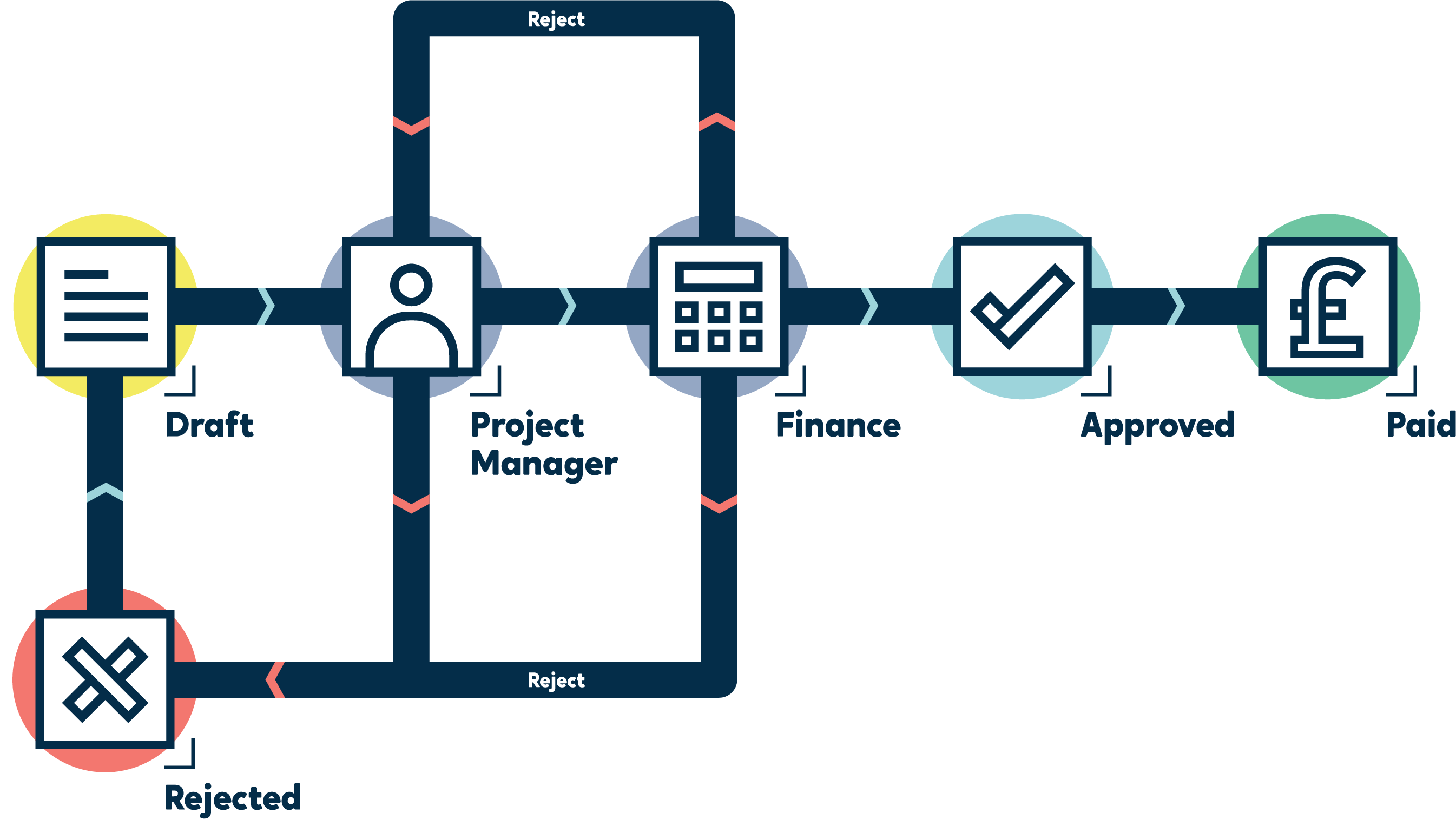
- When a Worker user creates a timesheet, they can save it as a Draft until they are ready to finalise it or submit it to their assigned Project Manager.
- Once submitted, the timesheet enters the With PM state, where the Worker user's Line Manager or Project Manager must review the timesheet and either Approve or Reject it.
- If Rejected at the With PM stage, the Worker user must review, edit and resubmit the timesheet from the initial Draft phase.
- If the Line Manager or Project Manager Approves the timesheet, the invoice is passed to the Finance department for Finance users to flag it as Approved for Payment.
- If the timesheet is Rejected by Finance, it can either be sent back to the With PM state or entirely Rejected, so the Worker user has to resubmit a new timesheet.
- Once the Approved for Payment invoice has been paid, a Finance user can mark it as Paid.
A Supervisor user can Approve a timesheet at any stage of the process, and they can also mark a timesheet as Paid.